You meet a potential customer at a wedding, a trade fair or a shop counter. You hand over your visiting card. Within a week, that card is either sitting safely in their wallet — or lost in the bottom of a bag, or worse, in the bin. The difference often comes down to design. A great business card is clear, professional and pleasant to hold. It reminds people who you are and makes it effortless to contact you. In this guide, we share 15 practical business card design tips to help you create a card people actually keep.
Why Business Cards Still Matter
With phone contacts and WhatsApp, some people assume business cards are outdated. In practice, they remain one of the most cost-effective marketing tools for small businesses, especially in India, where face-to-face relationships drive so much of business. A card is a physical reminder that stays with the person after the conversation ends.
- It creates a professional first impression in seconds.
- It carries your brand into wallets, desks and shop drawers.
- It is easy to pass on to friends and family — useful for word-of-mouth referrals.
- It works without internet, battery or app.
- It is affordable to design and print, even in small quantities.
Part 1: Content — What to Put on Your Card
1. Include Only the Essentials
A business card is not a brochure. The essentials are your logo, business name, your name and role (if relevant), phone number, email and website. Add your address only if customers need to visit you. Everything else is optional.
2. Make Your WhatsApp Number Obvious
For many Indian customers, WhatsApp is the first way they will contact you. If your WhatsApp number differs from your calling number, label it clearly. If it is the same, a small WhatsApp icon beside the number is enough. Many Kerala businesses also serve customers in the Gulf; if that applies to you, include the country code (+91) so international contacts can reach you easily.
3. Add a QR Code With Purpose
A QR code can link to your website, Google Maps location, WhatsApp chat, digital catalogue or a vCard that saves your contact in one tap. Use it for one clear purpose and test it with several phones before printing. Keep the code large enough to scan easily — tiny QR codes are a common mistake.
4. Use a Short Tagline or Service Line
A short line such as “Wedding Catering & Event Services” or “Mobile Phones, Accessories & Repairs” tells new contacts exactly what you do. This is especially useful when your business name alone does not explain your services.
5. Use the Back of the Card
Printing on both sides costs a little more but doubles your space. Use the front for your logo and brand, and the back for contact details. Or use the back for a list of services, a map, a Malayalam version of key information, or even an Arabic version if you serve Gulf clients.
Part 2: Design — Layout, Fonts and Colour
6. Keep the Layout Clean
White space makes a card look confident and premium. Crowded cards with every detail fighting for attention look cheap and are hard to read. Group related information together and align elements neatly to a grid.
7. Create a Clear Hierarchy
Decide what should be noticed first — usually your logo or name — then the service line, then contact details. Use size and weight to guide the eye, not a dozen different colours.
8. Choose Readable Fonts
Text on a business card is small, so legibility comes first. Use no more than two fonts, ideally matching your brand. Keep body text at around 8–10 points and avoid very thin or highly decorative fonts for phone numbers and emails. If you include Malayalam, choose a Malayalam typeface that pairs well with your English font in weight and style.
9. Use Brand Colours Consistently
Your card should look like it belongs with your signboard, letterpads, website and social media. Use your logo’s colours and maintain strong contrast between text and background. Light grey text on white, or dark blue text on black, may look stylish on screen but is hard to read in print.
10. Respect Safe Zones and Bleed
Keep all important text and logos at least 3–4 mm inside the trim edge, so nothing gets cut off. If colour or images run to the edge, extend them about 2–3 mm beyond the trim line (bleed). Printing and cutting are never perfectly precise, so these margins protect your design.
Part 3: Paper, Finish and Printing
11. Choose a Quality Card Stock
Thin, flimsy cards feel cheap. A thicker card stock — often around 300–350 GSM or more for standard cards — feels substantial and lasts longer in a wallet. Ask your printer to show physical samples before you decide.
12. Pick the Right Finish
The finish changes both the look and feel of your card. Here is a quick reference:
| Finish / material | Look and feel | Best for | Consider |
|---|---|---|---|
| Matte | Smooth, non-reflective, modern | Most professional services | Easy to read; colours slightly softer |
| Gloss | Shiny, vivid colours | Photo-heavy or colourful brands | Can show fingerprints; hard to write on |
| Matte lamination | Velvety, durable | Premium feel at moderate cost | Protects against moisture and wear |
| Spot UV | Glossy highlights on a matte card | Logos and key elements | Adds cost; best used sparingly |
| Embossing / foil | Raised or metallic details | Luxury, jewellery, bridal, premium brands | Higher cost and longer production time |
| PVC card | Plastic, very durable, water-resistant | Shops, membership and loyalty cards | Different printing process; check design limits |
13. Stick to a Standard Size
The most common size used in India is 3.5 × 2 inches (about 89 × 51 mm), and many printers also offer the international 85 × 55 mm size. Standard sizes fit wallets and card holders. Unusual shapes and sizes can make you memorable, but they cost more and may not fit where people keep cards.
14. Print in CMYK and Check a Proof
Design files for print should be in CMYK colour mode, with images at 300 DPI and fonts converted to outlines. Always check a final proof carefully — once 500 cards are printed with a wrong digit in the phone number, there is no undo.
Tip: Read every phone number, email address and website on your proof aloud, character by character, and then actually call or message the number. It sounds obvious, but a single wrong digit is one of the most common and costly business card errors.
15. Design for Your Audience and Industry
A wedding planner’s card can be elegant and decorative. A construction contractor’s card should feel solid and practical. A tech startup’s card might be minimal and bold. Think about who receives your card and what impression you want them to have.
Real-World Examples
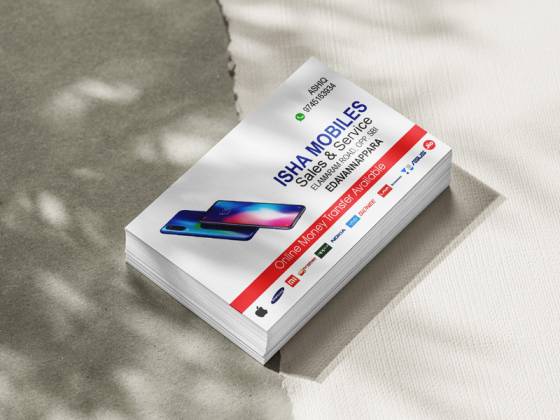
At Dzone Ads, we have designed business cards for a wide range of local and overseas businesses — including Isha Mobiles in Edavannappara, BMH Catering Services, Haritham Agricultural Nursery and Dohat Arad in Bahrain. Each needed a different personality: a mobile shop needs clarity and quick contact; a catering service benefits from warmth; a nursery naturally suits fresh, organic colours; and a Gulf-based client needs international contact formats. You can explore some of this work in our portfolio.
Pair Your Printed Card With a Digital Version
Many conversations in India now begin or continue on WhatsApp. Ask your designer for a digital version of your card — a sharp image or a small PDF sized for phone screens — that you can send instantly after a call or meeting, or save as a quick reply in WhatsApp Business. Keep the same layout and colours as the printed card so the brand feels consistent, but make sure the text is large enough to read on a small screen. This way, even contacts you never meet in person still receive your “card”.
Business Card Design Checklist
Before you approve your design for print, run through this checklist:
- Logo is sharp, correctly coloured and not stretched.
- Business name, person’s name and role are spelled correctly.
- Phone and WhatsApp numbers are correct, with country code if needed.
- Email and website addresses are correct and working.
- QR code scans correctly and leads to the right place.
- All text is readable at actual printed size.
- Important elements are within the safe zone; bleed is added.
- Colour mode is CMYK, and paper and finish are confirmed.
Matching Your Cards With the Rest of Your Stationery
Your visiting card is part of a family of printed materials: letterpads, envelopes, bill books, seals, ID cards and tags. Designing them together ensures consistency and often saves time and money. If you do not yet have a strong logo, it is worth starting there — see our logo creation service. Our business card design service covers visiting cards, ID cards and PVC cards, starting from ₹999, with the final quote depending on scope. And when the design is ready, our printing service can take care of production.
Key takeaways
- Include only essential details and make your WhatsApp number easy to find.
- Use the back of the card for services, a map, a QR code or a second language.
- Keep the layout clean, with readable fonts and strong contrast.
- Respect safe zones and bleed, and design in CMYK at 300 DPI.
- Choose a thick card stock and a finish that matches your brand.
- Proofread every number and address before printing — then test them.
Frequently Asked Questions
What is the standard visiting card size in India?
The most widely used size is 3.5 × 2 inches (about 89 × 51 mm). Many printers also offer 85 × 55 mm. Confirm the exact size with your printer before design begins.
Should I include my photo on my business card?
It can work for personal-brand professions such as real estate agents, consultants or doctors, where customers relate to the individual. For most businesses, a strong logo and clean layout are more effective.
Is a QR code necessary on a business card?
It is not required, but it is useful. A QR code can save your contact, open WhatsApp, show your location or link to your website. Make sure it is large enough and tested before printing.
How many business cards should I print?
For most small businesses, a few hundred cards per person is a practical start. Larger quantities reduce the cost per card, but if your details may change soon, print a smaller batch first.
Can I have a Malayalam or Arabic version of my card?
Yes. Many businesses print English on one side and Malayalam or Arabic on the other. The two sides should share the same layout logic, colours and logo so the card feels like one consistent design.
Want a visiting card that makes a strong first impression and stays in people’s wallets? Contact Dzone Ads on WhatsApp or email to get started on your design.