
Many small businesses still run entirely on word of mouth, a Facebook page and a WhatsApp number. That works — until a customer searches for you on Google and finds a competitor instead. A well-built website is the one online space you fully own: it works around the clock, answers common questions, builds trust and turns visitors into calls, WhatsApp chats and orders. This guide walks you through website development for small businesses in 2026, step by step, so you can plan confidently, avoid expensive mistakes and launch a site that actually brings in business.
Why Your Small Business Needs a Website in 2026
Social media is valuable, but it is rented land. Algorithms change, accounts get restricted, and your posts disappear down the feed within hours. A website gives you a permanent home that you control. It is also where serious customers go to check whether you are genuine before they spend money — especially for higher-value services such as catering, interiors, education, healthcare or travel.
- Customers can find you on Google when they search for what you offer.
- You look credible and established, even as a new or small business.
- Your services, prices, photos and location are always available in one place.
- Enquiries arrive through forms, calls and WhatsApp — even while you sleep.
- Your social media and ad campaigns have a professional destination to send people to.
- You can reach customers beyond your town, including the Gulf diaspora.
Step 1: Define the Goal of Your Website
Before thinking about colours or templates, decide what the website must achieve. A website without a clear goal tends to become a digital brochure that nobody reads. Common goals for small businesses include:
- Generate enquiries — calls, WhatsApp messages or quote requests (most service businesses).
- Sell products online — an online shop with cart and payments.
- Build credibility — show your work, team, facilities and approach (institutions, consultants).
- Share information — schedules, admissions, events, downloads (schools, colleges, organisations).
Pick one primary goal and one or two secondary goals. Every page, button and design decision should support them. For example, if your main goal is WhatsApp enquiries, a visible click-to-chat button on every page matters more than a fancy animation on the home page.
Step 2: Choose the Right Type of Website and Platform
There is no single “best” platform. The right choice depends on your goal, budget, and who will update the site after launch. Here is a practical comparison.
| Option | Best for | Pros | Cons |
|---|---|---|---|
| WordPress (custom theme) | Most service businesses, blogs, institutions | Flexible, easy to update, strong SEO options, huge ecosystem | Needs regular updates and good hosting |
| WordPress + WooCommerce | Small to medium online shops | Full control over products, payments and design | More maintenance than a hosted shop |
| Hosted shop builders | Product sellers wanting quick setup | Hosting and security handled for you | Monthly fees, less design freedom, platform lock-in |
| DIY website builders | Very small budgets, temporary sites | Quick to start, low upfront cost | Generic look, limited SEO and growth options |
| Fully custom-coded site | Unique features, web apps, portals | Complete freedom and performance | Higher cost, dependent on developer for changes |
For most small businesses we work with, a well-built WordPress website is the sweet spot: affordable, fast when done right, and easy for the owner to update without calling a developer for every small change.
Step 3: Plan Your Pages and Content
Content is the part most business owners underestimate. A beautiful design with thin, vague text will not convince anyone. Start with a simple sitemap. Most small business websites need these pages:
- Home — a clear headline saying what you do and for whom, key services, trust signals and a strong call to action.
- About — your story, values and what makes you different. Real photos beat stock images.
- Services or Products — one page per main service is better for both customers and Google.
- Portfolio or Gallery — proof of your work: projects, before/after photos, menus, events.
- Contact — phone, WhatsApp, email, address, a simple form and an embedded map.
- Legal pages — privacy policy and terms, especially if you collect data or sell online.
Optional but valuable: an FAQ page, a blog for helpful articles, a pricing page, and testimonials — but only genuine ones from real customers.
Writing Content That Converts
- Lead with the customer’s problem and your solution, not your company history.
- Use short paragraphs, clear headings and bullet points — most people skim.
- Mention your location and service areas naturally (for example, “serving Malappuram, Kozhikode and nearby”).
- Add a clear next step on every page: call, WhatsApp, request a quote.
- Consider Malayalam or bilingual sections if a large share of your customers prefer it.
Step 4: Design for Mobile First
Most of your visitors will arrive on a smartphone — often from a WhatsApp link, an Instagram bio or a Google search. Design the mobile experience first, then expand it for larger screens. Good web design for small businesses focuses on:
- Large, readable text and buttons that are easy to tap with a thumb.
- Tap-to-call and tap-to-WhatsApp buttons that are always easy to find.
- Simple navigation with only a few top-level menu items.
- Compressed images that load quickly on mobile data.
- Consistent branding — your logo, colours and fonts — so the site feels like your shop.
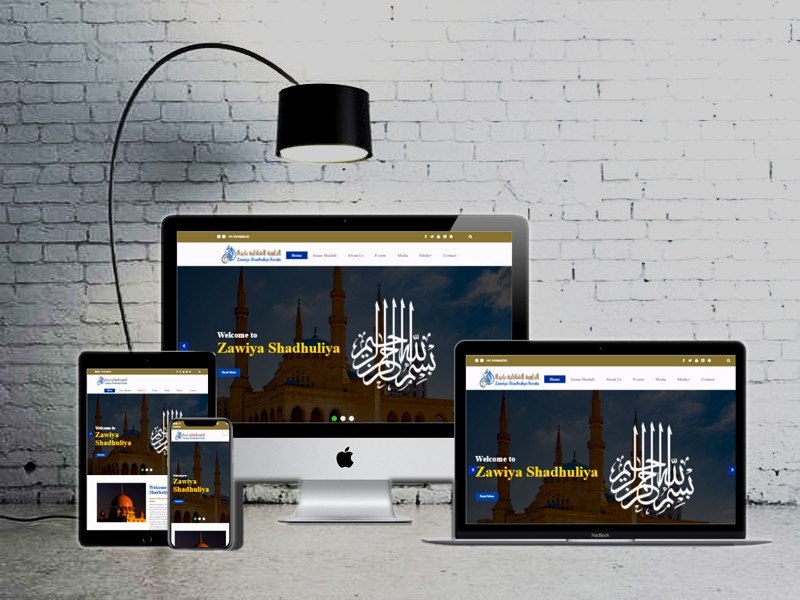
Organisations need the same clarity as shops. Our website for Zawiya Shadhuliya is one example of presenting an institution’s information in a calm, structured way — you can find it alongside other projects in our portfolio.
Step 5: Build for Speed, Security and SEO
A website that looks good but loads slowly or gets hacked is a liability. These technical foundations matter even if you never see them.
Speed
Visitors leave slow sites quickly, and search engines take page experience into account. Use good-quality hosting, optimise images (modern formats like WebP), avoid bloated page builders and unnecessary plugins, and enable caching.
Security
Every site should have an SSL certificate (the padlock and https), strong passwords, regular software updates and automatic backups stored off the server. If you run WordPress, keep the core, theme and plugins updated.
SEO Basics
Search engine optimisation starts during development, not after launch. Make sure each page has a unique title and meta description, a single clear main heading, descriptive image alt text and clean, readable URLs. Set up Google Search Console and submit your sitemap. For local businesses, a complete Google Business Profile linked to your website is one of the most effective steps you can take.
Tip: Register your domain name in your own name or business name, using your own email address — not your developer’s. You should always have the login details for your domain, hosting and website admin. A good agency will happily hand these over; it protects you if you ever change providers.
Step 6: Add the Features That Actually Help
It is tempting to add every feature you have seen elsewhere. Focus on what supports your goal:
- WhatsApp click-to-chat — for many Indian customers, this is the preferred way to enquire.
- Enquiry and quote forms — keep them short; ask only what you need.
- Google Maps embed — helps customers find your shop or office.
- Online payments — Indian payment gateways support UPI, cards and net banking for online shops and bookings.
- Booking or appointment system — useful for clinics, salons, consultants and coaching centres.
- Analytics — so you know where visitors come from and what they do.
Step 7: Test, Launch and Promote
Before going live, test thoroughly. Use this pre-launch checklist:
- All pages display correctly on Android, iPhone, tablet and desktop.
- Every form sends to the right email and shows a thank-you message.
- Phone and WhatsApp buttons open correctly on mobile.
- No broken links, missing images or placeholder “lorem ipsum” text.
- Titles, meta descriptions and alt text are filled in.
- SSL is active and the site loads on https.
- Analytics and Search Console are connected.
- Privacy policy and contact details are accurate.
Launch is the beginning, not the end. Add your website link to your Google Business Profile, Instagram and Facebook bios, WhatsApp Business profile, visiting cards, brochures and shop signage. Running targeted social media promotion to your new pages can bring the first wave of visitors while your search rankings grow.
What Does Website Development Cost?
Cost depends on the number of pages, design complexity, features like e-commerce or booking, content writing, and ongoing maintenance. Beyond the build itself, budget for annual domain renewal, hosting, and occasional updates. At Dzone Ads, business websites start from ₹14,999, with the final quote depending on scope. You can learn more on our website development service page or compare options on the pricing page.
When comparing quotes, look beyond the headline price. Ask what is included: number of pages, revisions, mobile optimisation, basic SEO setup, training, and support after launch. A cheaper site that you cannot update or that loads slowly often costs more in the long run.
Keeping Your Website Healthy After Launch
A website needs light, regular care to stay secure and useful:
- Update software, themes and plugins monthly.
- Check that backups are running.
- Refresh content — new projects, offers for Onam, Eid, Christmas or wedding season, updated prices.
- Review analytics to see which pages bring enquiries and improve the ones that do not.
- Publish helpful articles that answer your customers’ common questions.
Key takeaways
- Your website is the one online asset you fully own — social media is rented land.
- Define one clear goal first; let it guide pages, design and features.
- For most small businesses, a well-built WordPress site balances cost, flexibility and ease of updates.
- Design for mobile first with prominent call and WhatsApp buttons.
- Speed, security and SEO basics must be built in from day one.
- Keep ownership of your domain and hosting, and maintain the site after launch.
Frequently Asked Questions
How long does it take to build a small business website?
A simple website with a handful of pages can often be completed in a few weeks, depending on how quickly content and feedback are provided. Online shops and sites with custom features take longer. Having your text, photos and logo ready speeds things up considerably.
Do I need a website if I already have an Instagram page?
Yes. Instagram is excellent for visibility, but you do not control it. A website appears in Google searches, builds trust, holds detailed information and gives your ads and social posts a professional destination. The two work best together.
Can I update the website myself after it is built?
With a platform like WordPress, yes. You can usually edit text, add photos, publish blog posts and update prices yourself. Ask your developer for a short training session and simple instructions at handover.
Should my website be in Malayalam or English?
It depends on your customers. Many Kerala businesses use English as the main language with key sections, banners or offers in Malayalam. If most of your audience prefers Malayalam, a bilingual site is worth considering.
What ongoing costs should I expect?
Plan for yearly domain renewal, hosting fees, and optional maintenance or content updates. If you sell online, payment gateways usually charge a small fee per transaction. Ask for these costs upfront so there are no surprises.
Planning a new website or ready to replace an outdated one? Share your goals with us and we will recommend the right approach for your business. Get a free website quote from Dzone Ads today.